Top 10 Tips and Tricks for a Successful Glean Deployment

At Alchemy Technology Group, we deploy Glean for customers across the country. Our Glean architects have led roughly a dozen implementations in the past year, and we ran our own internal deployment before we ever touched a client environment.
That volume taught us something worth saying out loud: Glean has the lowest barrier to entry of any AI platform on the market. A user opens a browser and Glean is simply there. Connecting sources is fast. Scaling is fast. Which means the hard part of a Glean deployment is almost never the technology. It is everything around the technology: outcomes, permissions, connectivity, adoption, governance, and cost.
Below are the ten tips we give every customer, organized the way we actually run an engagement.
The ten tips at a glance
- Business Outcomes
- Identity and Permissions Foundation
- Get the most out of your Data
- Prioritize your Sources
- Leave no data behind
- The power of the data platform
- Pilot before release
- Roll out in waves
- Establish governance first
- Agents automate Business Outcomes
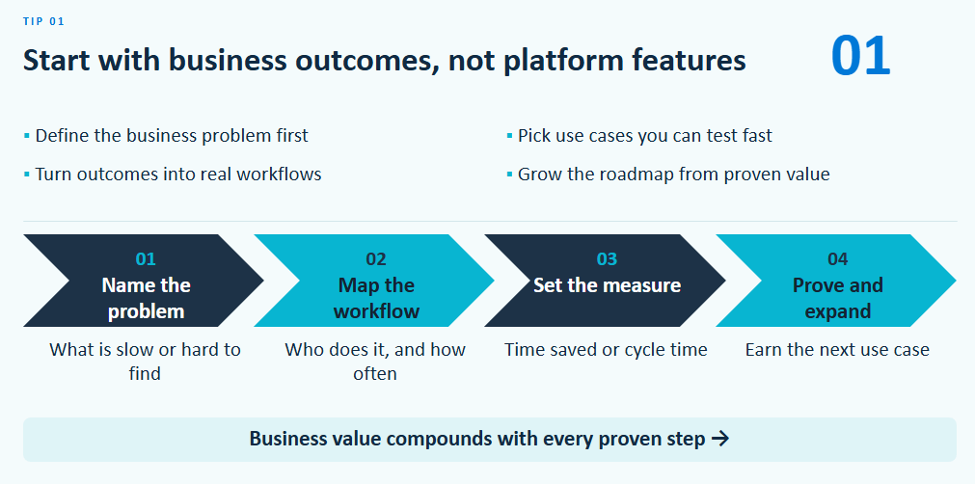
1. Start with business outcomes, not the platform
The most common failure mode in any AI project is deploying a platform for the sake of deploying a platform. Our favorite way to describe it: if you tell AI to reinvent the wheel, it hands you a square. Not because the model failed, but because nobody defined the problem. Did we want the wheel better? A different shape? Cheaper?
Name the problems that exist today before you deploy anything. This is why our onboarding packages bring business analysts alongside our Glean architects. Every package includes a fixed pool of hours, and understanding outcomes first is how you make sure those hours go toward questions that matter.
2. Make identity and permissions the foundation
When a user queries Glean, results must reflect exactly what that person could see logging into each source directly. Glean handles this by design: as it ingests data, it pulls permissions alongside it, and resolves your access before retrieving a single file. We have tried to prompt our way around it and have never seen it leak.
The risk is not Glean. The risk is what Glean reveals. Because it makes data dramatically easier to find, it surfaces governance gaps that were always there. We have found a hidden subfolder holding salary data and upcoming terminations. We have seen a manager retain mailbox access after an employee left, the join never broken, so Glean was faithfully answering from a former employee's email. In both cases the access model was already broken.
Run a governance sweep before going broad. If you have Varonis or Purview, use it. If not, Glean Protect Plus surfaces sensitive findings inside Glean and removes them automatically.
3. Get the most out of your data
Glean's differentiator is the knowledge graph. Compare it to a tool that simply wires up MCP: you ask a question, it picks one source, sends one query, returns one answer. Glean connects your ERP, CRM, SharePoint, OneDrive, inbox, calendar, Teams channels, data platforms, your website and your competitor's website, and assembles all of it into one graph.
The difference shows in ordinary questions. Ask Glean to prep you for a customer meeting and it does not just hit the CRM. It checks the last email you sent, when you last met, what your team said in Teams, and what the data lake says about that customer's seasonality over several years. One cohesive answer, because it reaches that widely. Because the context is already indexed, answers come back faster, usage costs and rate limiting stay out of the picture, and you do not need sophisticated prompt engineering to get good grounding.
4. Sequence your sources into three lanes
A typical customer has eight to fifteen data sources. You want all of them in the graph eventually, but not on day one. Every source should land in one of three lanes: wave one for high value, high traffic quick wins; wave two for niche applications where a handful of users get real value; and the roadmap lane for sources needing custom connector work. Nobody's ecosystem is ever finished, so treat this as a living list.
5. Leave no data source behind
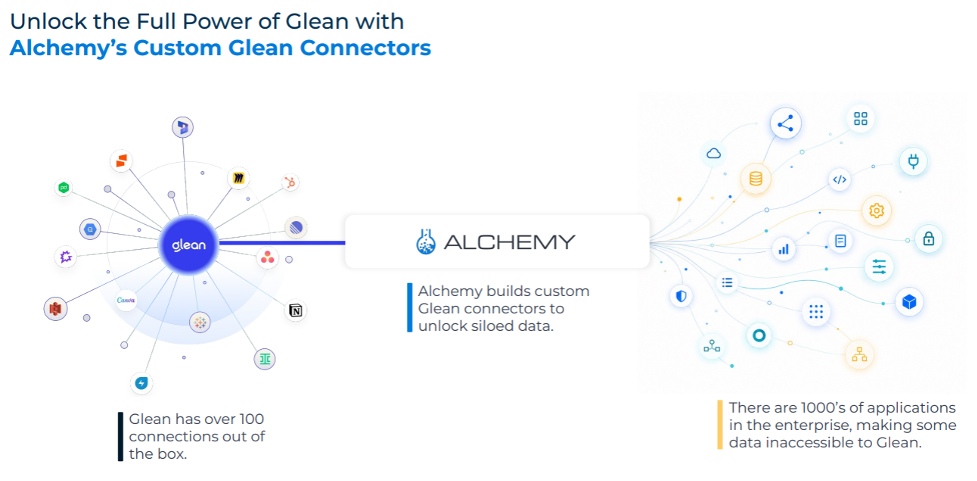
Glean ships more than 120 native connectors, and for almost every customer nine out of ten sources are plug and play. But there is always that last one or two: a homegrown application, a legacy system, an on premise file share, an industry platform nobody builds a connector for. That is frequently where the most valuable proprietary data lives.
This is where Alchemy does its most distinctive work. We turn custom connectors around in a couple of weeks, working from APIs, webhooks, data extracts, or building from scratch. We build custom tools and MCPs when Agents need to act on a user's behalf. Glean's scalability means the absence of a native connector is a scoping decision, not a limit.
Eighty percent coverage is a good start. One hundred percent is what makes search trustworthy.
6. Use a data platform for the quantitative questions
Quantitative work is a different game from qualitative retrieval. An LLM can surface a number that already exists in a slide, but interpreting a database to build a forecast is genuinely hard.
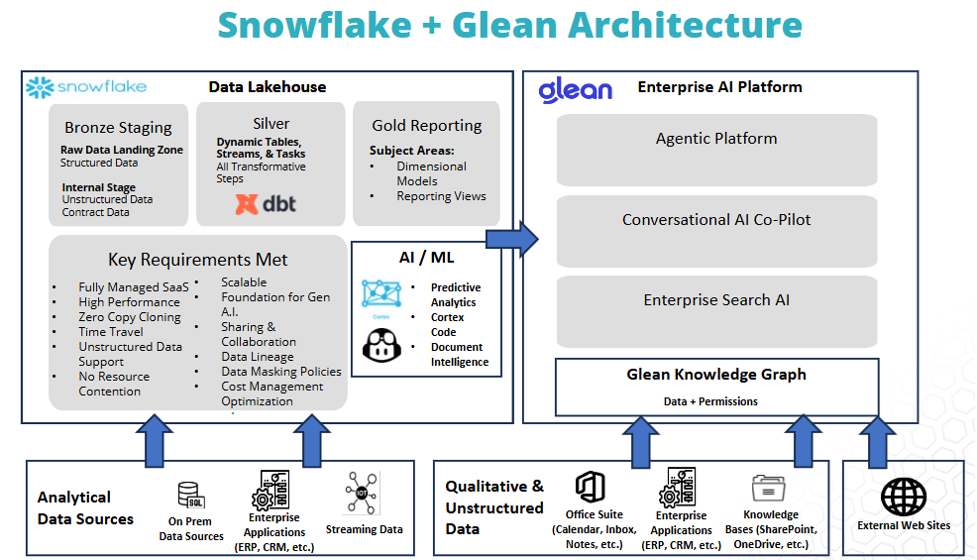
Glean connects natively to Snowflake and Databricks, leveraging Cortex and Genie. A question like "build me a forecast with confidence intervals on which customers will buy what" gets translated to SQL, executed where the data lives, and returned inside Glean with no second platform to log into.
The real payoff is the follow up. Ask why revenue is down and Glean tells you a product is off twenty percent. Ask why that happened and it goes back to the knowledge graph: a major customer switched to a competitor, another product is cannibalizing this one, or a manufacturer's warehouse burned down and supply cannot meet demand. Anyone can pull a dashboard and watch a number move. Glean is uniquely positioned to explain the why.
It works in reverse too. However mature your Snowflake practice, you are never ingesting email, PDFs, and presentations into the warehouse. Glean is where those two worlds meet.
7. Pilot with a deliberately diverse champion group
We have never taken a customer live to everyone at once. Company size is irrelevant: twenty people or three hundred thousand, we want a pilot group. At a twenty-person company that is still five to seven people.
Choose for diversity across department and tenure. Long-tenured people know how the company works and where data hides. New hires tell you whether Glean makes someone productive quickly. Representing HR, sales, and technical teams separately tells you what Glean does for each.
The pilot teaches you what people ask, and it is never what you planned. You spend weeks on the ERP and CRM, and the first question is "what is my PTO policy?" That is a signal to move a source up the list. Glean tunes itself as usage grows, and we have admin side levers to pull during this phase to keep responses credible.
8. Roll out in waves, with enablement attached to each
You get roughly one chance to earn user trust. Work in isolation for six months, launch to everyone, let something be wrong, and you are back to square zero.
So, we go group by group: pilot, next business unit, next, then org wide. Each wave might take only a week or two but doing it in sequence means every group gets its own training and communications. Org wide launch gets company lunch and learns. By then your pilot group can help colleagues with prompt engineering and use case ideas. Your users learn how to use Glean while Glean learns how to be useful to them.
9. Establish governance, ownership, and cost controls before go live
Identify early who owns each data source, who the IT admins are, and critically, who owns Glean governance long term. Helping customers stand up a center of excellence is one of the highest leverage things we do. We run admin training in two workshops: the first covers every lever available, the second gets specific to your organization. Should Glean use your templated PowerPoints? Who can create Agents? Do you need an approval process before an Agent is shared? Those decisions get configured before a pilot group logs in.
Cost governance is where Glean genuinely shines. You are not locked into one LLM. Gemini, OpenAI, Anthropic, and GLM are available now with AWS coming, and you can enable, disable, or scope any of them by group. That is strategic insurance. If one vendor's token pricing triples overnight, you deprecate that model and quietly route users elsewhere without anyone losing a second of productivity.
The everyday version matters just as much. Glean's usage analytics show which Agents, models, and users consume the most tokens. At Alchemy, our services team does heavy research with large inputs, so they get high end models. Other departments have straightforward needs and are better served by efficient ones. Everyone wants the best of the best. Most work does not require it, and part of our admin training is helping teams tell the difference.
10. Convert your prime use cases into Agents
This closes the loop back to tip one. Understanding business outcomes only pays off when you turn them into working Agents.
We use Agents all day internally: setting up the day, tracking action items, drafting email, pulling context before meetings. Use case discovery runs through the whole project rather than waiting for the end. We collect ideas from the pilot group and teach end users how to find their own use cases and how to have Glean help them build, debug, and refactor.
Your requirements will change as new standard operating procedures create new Agents. This is where the center of excellence earns its keep. You do not want every user building in isolation. You want designated builders, an approval path, and a way to publish a finished Agent broadly so it is maintained in one place.
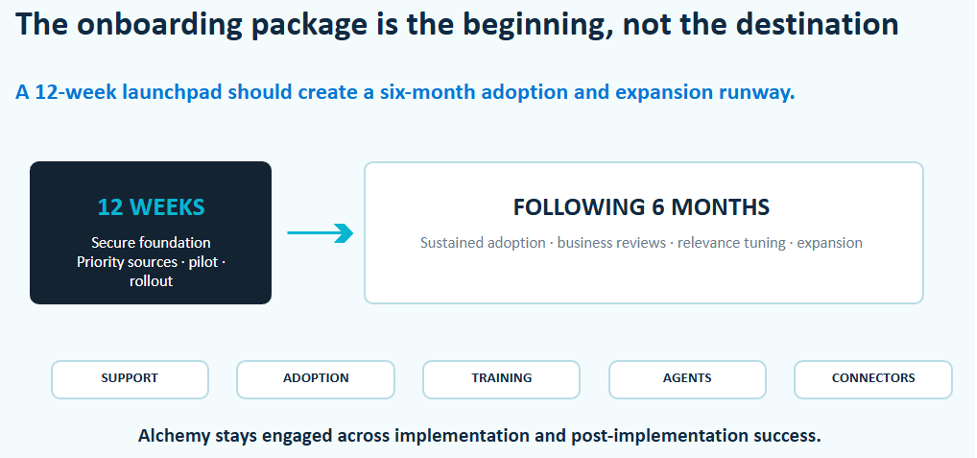
The onboarding package is the first twelve weeks, not the finish line
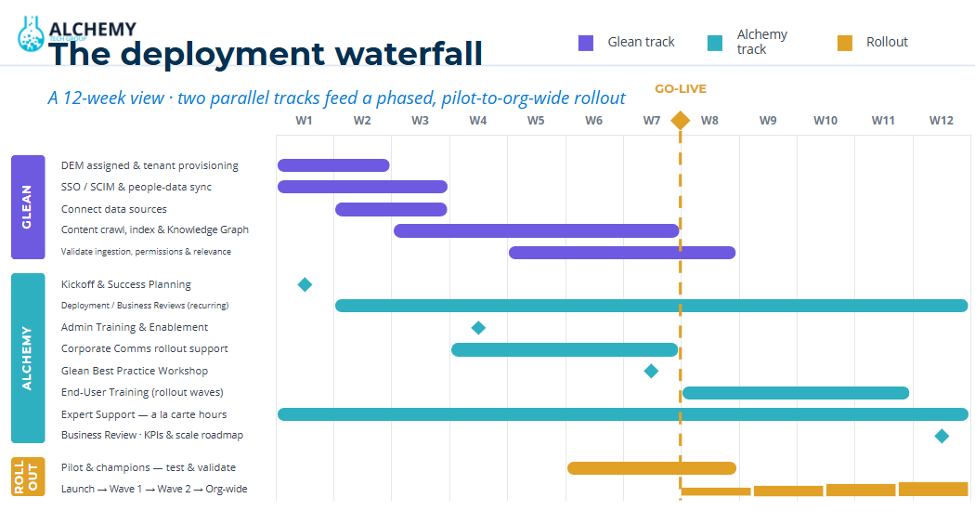
Every Glean deal includes an onboarding package, and it is best understood as the first twelve weeks of your Glean lifespan. Alchemy is highly tuned for that window. But sustained adoption is what happens next, which is why we offer follow on engagements covering ongoing support, continued training, center of excellence development, Agent expansion, and additional custom connectors across the following six months.
If you take one thing away, take this: a successful Glean deployment is a playbook, not an installation. Connectivity strategy, business use cases, a data strategy for numbers based questions, security and governance, and cost monitoring all have to work in conjunction. Get them running together and you have the best of breed enterprise AI platform on the market driving real productivity.
These are the conversations we lead with customers every day. If you want to talk through your Glean deployment, your broader AI strategy, or see Snowflake and Databricks integration in practice, we would be glad to hear from you.
Author
 Andy Quirin